Catalog & ERD
The catalog is the home base of a dbdocs site: every model, source, seed, and snapshot, grouped the way your warehouse organizes them.
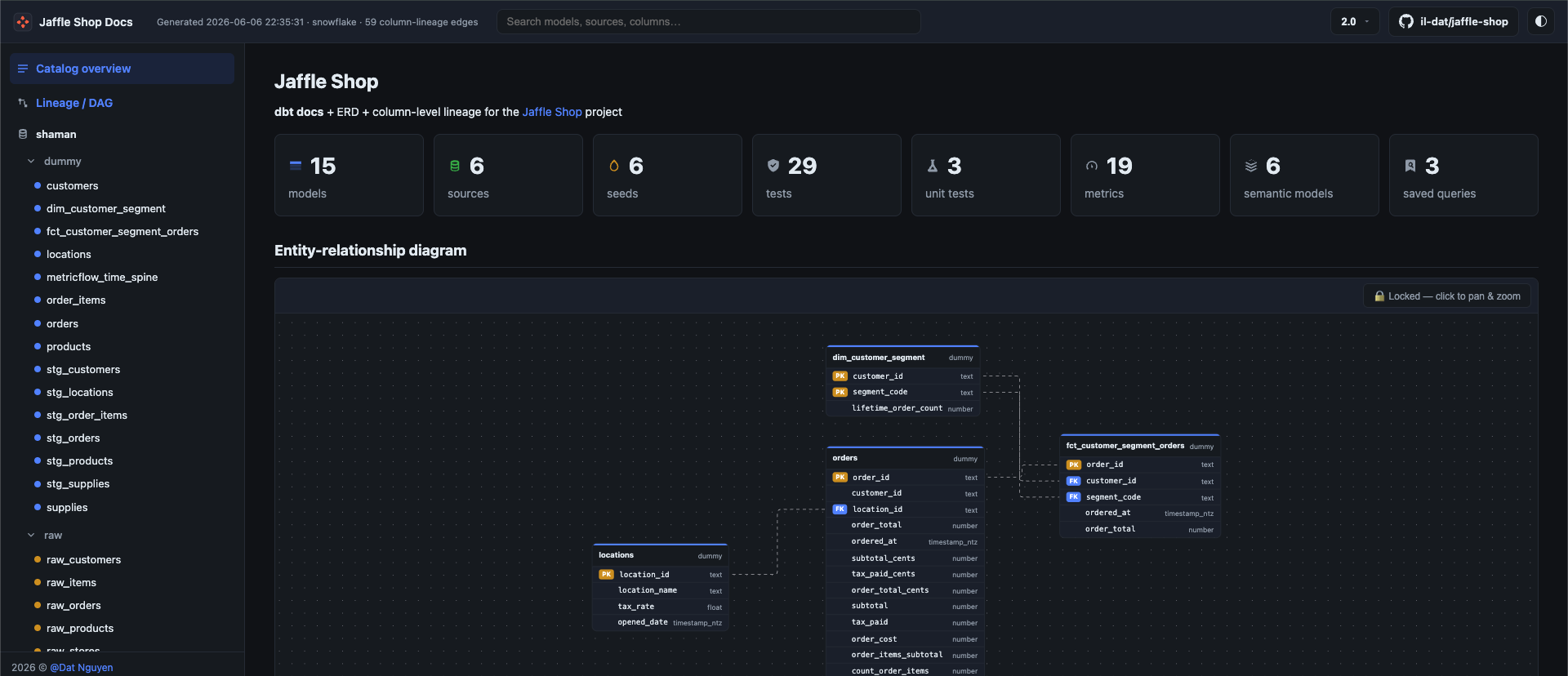
Navigation by database → schema
Nodes are grouped into a tree.byDatabase structure, so the sidebar mirrors how your data actually lives: database, then schema, then the objects inside. No flat wall of 400 models.
Per-model detail
Open any node and you get:
- Columns — name, type, tags, and description, pulled from the catalog and your dbt YAML.
- Compiled and raw SQL — toggle between what you wrote and what dbt sent to the warehouse.
- Resolved macros — the macros each model expands, so you can trace where that mystery CTE came from.
- Upstream column lineage — see Column-Level Lineage.
Client-side search
Search is fully client-side — there's no backend to stand up. dbdocs ships a vendored minisearch index baked into the page, so typing a model or column name filters instantly, even offline.
The ERD
Alongside the catalog, dbdocs renders an interactive entity-relationship diagram derived from your dbt project via the dbterd Python API.
- Tables render their columns with primary- and foreign-key badges, so the relationships aren't left to your imagination.
- Built on React Flow — pan, zoom, minimap, focus, the same interactions as the Lineage DAG.
- Relationship detection follows dbterd's algorithms (relationship tests, model contracts, semantic entities) — configurable via the
dbterd:block in Configuration.