Column-Level Lineage
This is the feature dbt's own docs don't give you: for each model, dbdocs traces every output column back to the source columns it came from.
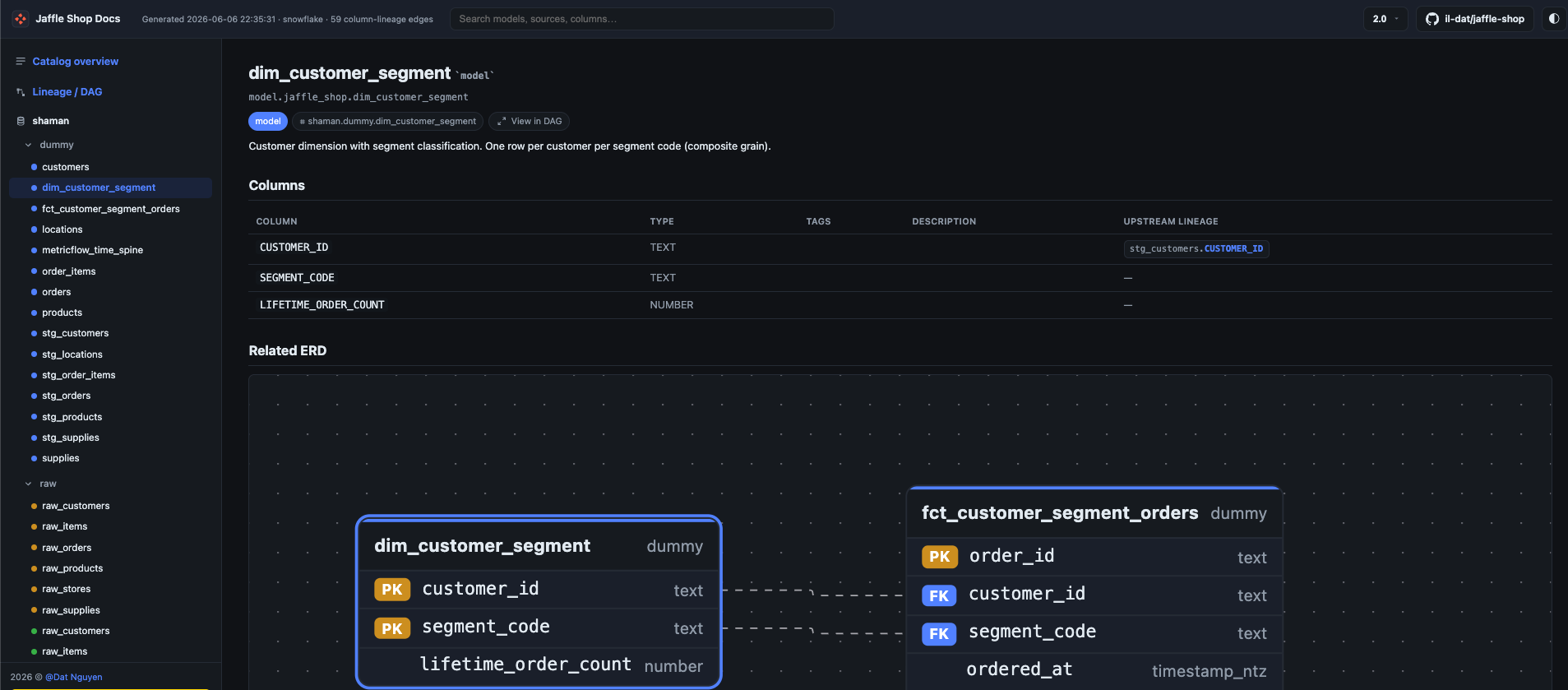
How it's derived
For each model, dbdocs:
- Takes the model's compiled SQL (what dbt actually sent to the warehouse).
- Parses it with sqlglot.
- Qualifies it against a schema built from
catalog.json, soSELECT *and unqualified columns resolve to real, fully-named columns. - Traces each output column to its upstream source columns.
The result shows up inline as an "Upstream lineage" column right in the model's column table — no separate view to hunt for.
Fail-soft by design
Column-level lineage is best-effort. Some SQL is genuinely hard to parse, and a single gnarly model should never sink the whole build. So per-model failures are caught, logged, and skipped — generate completes and reports how many models were skipped. You get lineage for everything that parsed, and a clear count of what didn't.
Picking the dialect
Parsing accuracy depends on the SQL dialect. By default dbdocs uses your artifact's adapter_type (snowflake, bigquery, postgres, …). Override it when needed:
…or set dialect: in dbdocs.yml.